# Cast
Cast turns a prompt into a workflow of tasks, and runs it. You write the prompt in a markdown editor, an agent plans it as tasks you can review and edit, and agents work the tasks in a virtual machine with your folder mounted. A wizard casts a spell. You cast a prompt.
[Watch the demo (32 s)](docs/demo.mp4). A prompt for a dice roller becomes a plan of two tasks, one line of feedback splits it into three parallel tasks and a check, and the run builds the page. The agents took about 15 s to plan, 30 s to refine, and 60 s to run, sped up here.
## How it works
Cast is one binary. It opens a directory, and everything you run happens in that directory.
1. **Write the prompt.** The editor has the markdown source on the left and a live preview on the right, with images, video, and mermaid graphs.
1. **Generate a workflow.** An agent reads the prompt and plans it as tasks, grouped into steps. Tasks in one step run in parallel. A second, fresh agent checks the plan before you see it.
1. **Review it.** Each task lists the decisions the agent made, its acceptance criteria, and the evidence it will attach. Edit a task, add one, or tell the agent what to change.
1. **Run it.** Run the whole workflow, one step, or one task. Pause at any point.
An agent never runs on your machine. Cast boots a QEMU VM with the directory mounted at `/work`, and the VM's changes land in your folder as the agent makes them. Cast doesn't touch git. An agent does when your prompt asks for it.
### The prompt editor
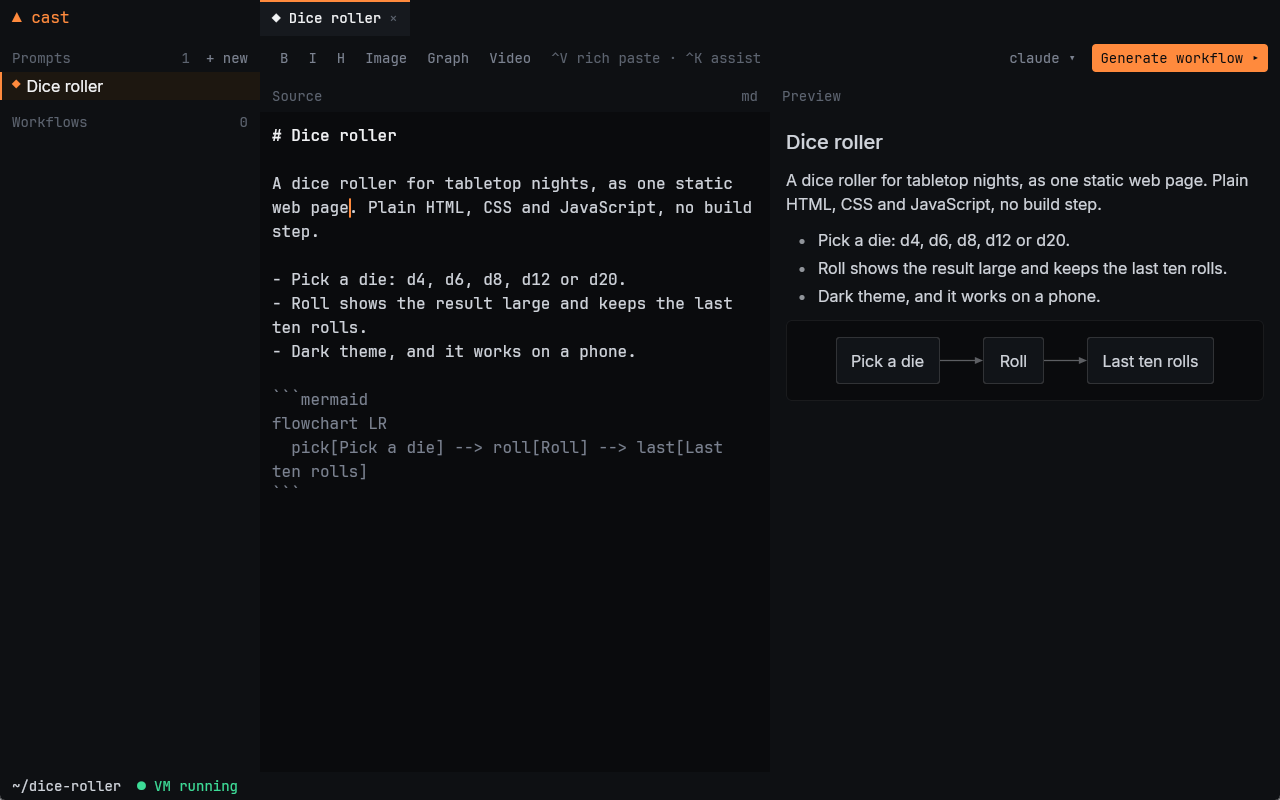
- **Image**, **Graph**, and **Video** in the toolbar embed media at the cursor.
- Ctrl+V pastes rich content. Copied HTML becomes markdown, and a copied image becomes a file and a link to it.
- Ctrl+K asks an agent. With no selection, it writes at the cursor. With a selection, it edits those lines. Tab accepts the proposal, and Esc dismisses it.
### The review
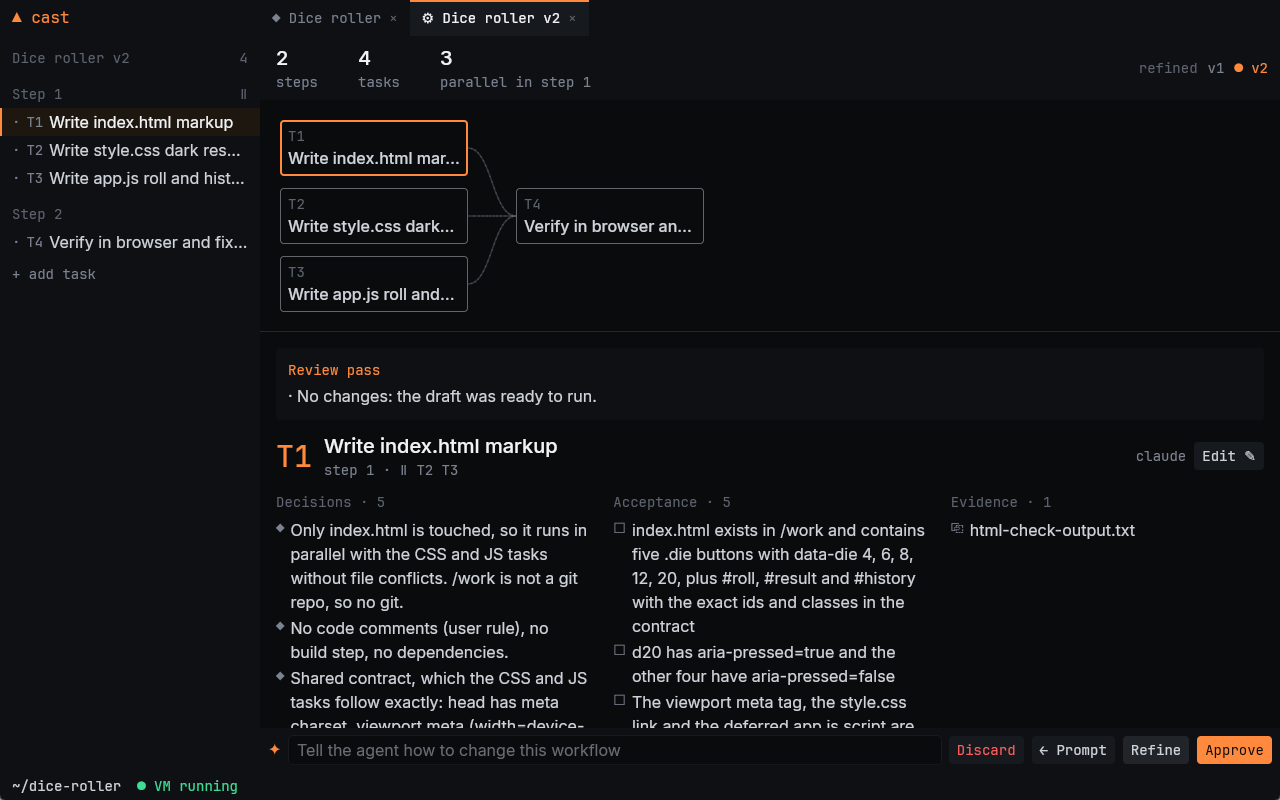
The graph shows the steps from left to right. Click a task to read its decisions, acceptance criteria, and evidence. **Edit** changes a task by hand. To change the plan, write what should change in the box at the bottom and click **Refine**. Each refine makes a new version, and Cast keeps the old ones on disk. **Discard** drops the version, **Prompt** goes back to the editor, and **Approve** makes the workflow ready to run.
### The run
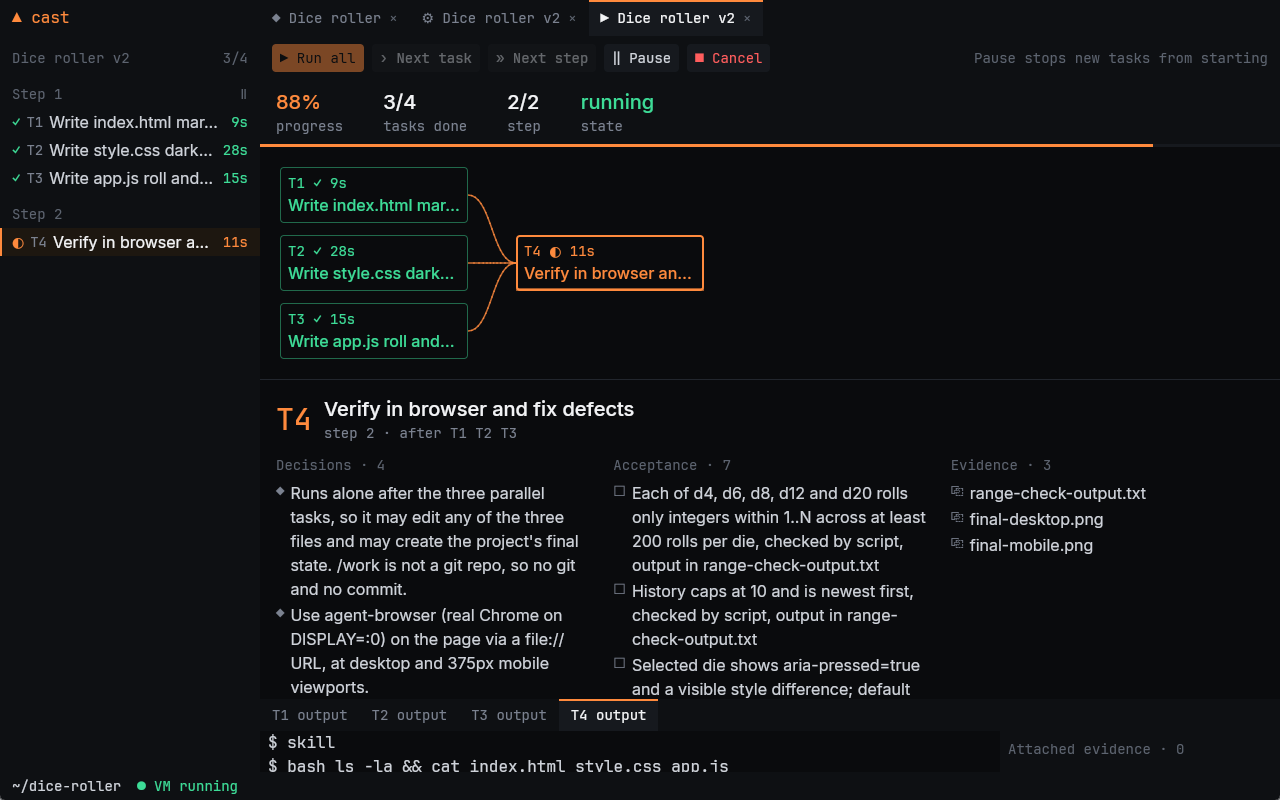
| Control | What it does |
|---|---|
| **Run all** | Runs every step in order. |
| **Next task** | Runs one task, then waits. |
| **Next step** | Runs the tasks of the current step, then waits. |
| **Pause** | Starts no new task. Running tasks finish. |
| **Cancel** | Stops the running tasks. |
Each task streams its agent's output into its own tab, and the files it attaches as evidence show next to it. Cast saves each run's state and evidence to disk.
## Get started
You need:
- Linux on x86-64 with KVM. macOS comes later.
- `qemu-system-x86_64`, `qemu-img`, `xorriso`, `ssh`, `ssh-keygen`, and `git`.
- Rust, for the build.
- A key for the coding agent: `CLAUDE_CODE_OAUTH_TOKEN` for Claude Code (make one with `claude setup-token`), or `OPENCODE_API_KEY` for opencode. Export it in the shell that starts Cast, or type it into the app on first run.
- About 6 GB of disk for the VM images, and 8 GB of free memory while a directory is open.
Clone this repo, then run every command from its root.
1. Build and install the binary:
```sh
cargo build --release
install -Dm755 target/release/cast ~/.local/bin/cast
```
1. Open a directory:
```sh
cast ~/code/dice-roller
```
1. On the first run, Cast shows the setup screen. Check the agent credentials, then click **Bake VM**. The bake downloads the Debian 13 cloud image (435 MB), installs the dev packages, Claude Code, opencode, Rust, Go, Node, and agent-browser, copies your `~/.claude/CLAUDE.md` and skills into the image, and sets up an XFCE desktop so agents can test GUIs. Click **Continue** when it finishes.
The status bar shows **VM running** once the VM is up. Write your prompt, then click **Generate workflow**.
The key, your `CLAUDE.md`, and your skills are baked into the image. After you change any of them, open the settings and click **Rebake**.
## Keys
| Key | What it does |
|---|---|
| Ctrl+O | Opens a directory. |
| Ctrl+N | Starts a new prompt. |
| Ctrl+S | Saves the prompt. Cast also saves as you type. |
| Ctrl+W | Closes the tab. |
| Ctrl+, | Opens the settings. |
| Ctrl+K | Asks an agent to write at the cursor, or to edit the selection. |
| Ctrl+V | Pastes rich content as markdown. |
## Settings
The settings live in `~/.config/cast/config.json`, and the app edits them for you.
| Key | Meaning |
|---|---|
| `default_agent` | `claude` or `opencode`. The prompt editor and each task can override it. |
| `claude_token` | The Claude Code token. Empty means Cast reads `CLAUDE_CODE_OAUTH_TOKEN`. |
| `opencode_key` | The opencode key. Empty means Cast reads `OPENCODE_API_KEY`. |
| `opencode_model` | The model for opencode runs. |
| `recents` | The last 8 directories you opened. |
## Where things live
Cast writes nothing into your directory. All of its state is plain files under `~/.local/share/cast`:
| Path | Contents |
|---|---|
| `projects//prompts/` | The directory's prompts, as markdown. |
| `projects//workflows//v.json` | Each version of a prompt's workflow. |
| `projects//runs/-v/` | A run's state, and each task's evidence in a folder named for the task. |
| `debian-13-generic-amd64.qcow2` | The Debian cloud image the bake starts from. |
| `cast.qcow2` | The baked VM image. Every VM boots from it as a snapshot, so a run never changes it. |
| `console.log` | The VM's console, for when a bake or a boot fails. |
## Develop Cast
| Task | Command |
|---|---|
| Build | `cargo build --release` |
| Tests | `cargo test` |
| Lint | `cargo clippy --all-targets -- -D warnings` |
| Format | `cargo fmt` |
| Path | Contents |
|---|---|
| `src/editor` | The prompt editor, its preview, media, and the agent assist. |
| `src/workflow` | The workflow model, its graph, and the review. |
| `src/exec` | The run: the state machine, its record on disk, and its view. |
| `src/agent` | Agent jobs over SSH, their prompts, and the parser for their output. |
| `src/vm` | The bake, the boot, and the provisioning of the VM. |
| `src/setup`, `src/settings` | The first-run screen and the settings. |
| `assets/provision.sh` | The script that provisions the VM image during the bake. |
[cast.md](cast.md) is the vision for Cast, and [CLAUDE.md](CLAUDE.md) has the rules for working on it. Cast is built with [Rune](https://github.com/anomalyco/rune).
## License
MIT.